BusZone
ByteCurve, LLCEducation
4.5149.00 Reviews
- Version
- 2.1.7
- Installs
- 10.00K
- Age Rating
- Everyone
Screenshots
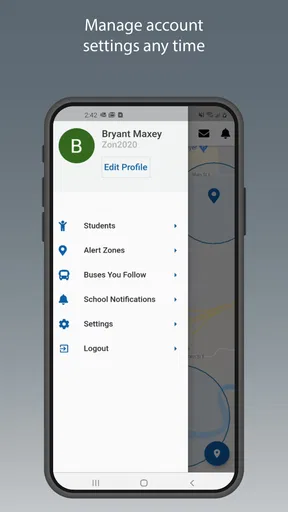
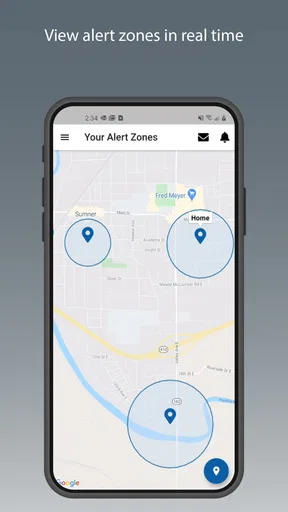
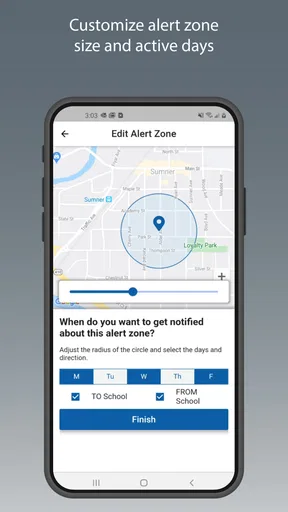
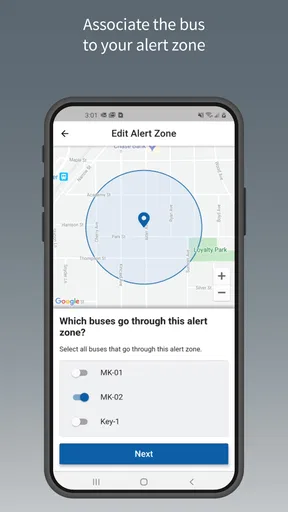
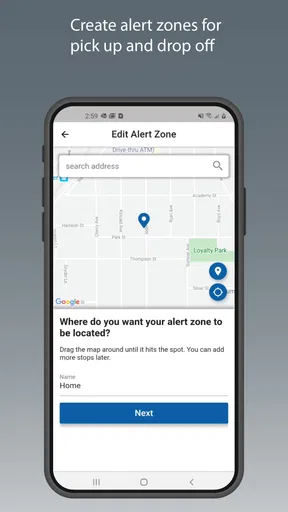
Our Review of BusZone
 Analysis by Appyee
Keeping track of a child’s school bus is one of those everyday problems that can create much more stress than it should. A bus may arrive early, traffic may slow it down, or a child may take longer than expected to come outside. BusZone approaches that problem with a clear purpose: it lets parents view a child’s bus location in real time instead of relying entirely on a printed timetable or a message from school.
I reviewed it as an education app rather than as a general navigation tool. That distinction matters. This is not something I would install to monitor every vehicle in a city or replace a full mapping service. Its value is narrower and more practical: when the school transportation system connected to your child’s route supports it, the app can give you a better sense of when the bus is moving and when it is getting close.
That focused role is also why trust matters so much here. An app connected to a child’s journey naturally raises questions about who can see the location, what information is required, and how much control a parent has. BusZone is developed by ByteCurve, LLC, and it is free to use, with an Everyone content rating. Those details make it approachable, but they do not remove the need for a parent to look carefully at the sign-in process, permission prompts, and any choices shown during setup.
How BusZone fits into a parent’s daily routine
The most useful way to think about BusZone is as a timing aid. Instead of sending a child outside early “just in case” or standing by the curb for an uncertain stretch, I can check the route and make a more informed decision about when to leave the house. That is especially helpful in bad weather, during busy mornings, or when the pickup point is not immediately outside the home.
A realistic example would be a parent preparing breakfast while a child gets ready for school. Rather than repeatedly looking through the window, the parent can check the bus position, finish the current task, and then walk with the child to the stop when the vehicle is approaching. The app does not eliminate the need to plan ahead, but it can reduce the amount of idle waiting that surrounds the trip.
The same idea works in the afternoon. A parent working from home may not know whether the child is still on the bus, nearly at the stop, or delayed somewhere along the route. A live location view can help the parent decide whether to remain available at the entrance, finish a call, or ask another trusted adult to meet the child. That is a small change, but it can make the school-day routine less rigid.
I would not treat the map as an exact countdown. Vehicle location is useful for understanding movement and general proximity, but traffic, road closures, boarding delays, and the final approach to a stop can all change the timing. My practical advice is to use the display as a prompt to get ready, not as permission to arrive at the last possible second.
This is where BusZone differs from the usual alternatives. A paper schedule gives a planned time but cannot reflect the bus’s current position. A group message can provide updates, but only when someone remembers to send one and the information reaches everyone. A general map app may show roads and traffic, yet it is not necessarily connected to a child’s school route. BusZone occupies the space between those options by focusing on the transportation journey itself.
What the app is good at when the routine is predictable
BusZone makes the most sense for families with a regular bus route and a parent who wants a quick visual check before heading to the stop. It is also useful when several people share responsibility for pickup. One parent may be at work, another may be at home, and a relative may occasionally help. A shared understanding of where the bus is can be more useful than forwarding a schedule that everyone already has.
Another practical use is reducing unnecessary exposure to poor weather. If the stop is a short walk away, leaving too early may not be a major issue. If it requires waiting beside a busy road, crossing an open area, or standing outside in rain or cold, knowing that the bus is still some distance away can help a family choose a safer and more comfortable moment to leave.
There is a trade-off, however. The app only becomes meaningful when its route information matches the child’s actual transportation arrangement. If a child uses different buses on different days, is picked up by car, or changes between school activities, the parent still needs to confirm the plan independently. A location screen cannot replace communication with the school or the adult responsible for the child.
Trust begins with what you can see during setup
Because BusZone deals with a child’s travel context, I would pay more attention to setup than I would with a simple educational quiz app. Before accepting anything automatically, I would read each permission request, check which account details are requested, and note whether the app gives a clear explanation for each choice. Those are visible points of user control, and they are more useful than broad assumptions about privacy.
I would also make sure the parent account is protected by a strong, unique password if the app requires one. A location-related account should not reuse the same password as an easily forgotten shopping or entertainment account. If the app presents sign-out, account removal, notification, or sharing controls, I would review them immediately rather than waiting until the information is no longer needed.
That approach is not a criticism of ByteCurve, LLC. It is simply the right standard for any service that helps a parent follow a child’s route. Trust should come from understandable screens and deliberate choices: knowing which account is active, recognizing who has access, and being able to change the settings that are actually offered.
The app has an average rating of 4.5 from more than 800 ratings, alongside over 100 written reviews. I see that as a useful sign that the basic idea works for a meaningful group of families, but I would not treat the rating as proof that every school route or setup experience will be identical. Transportation systems differ, and an app can feel excellent when the route data is current yet much less useful when the underlying school information is incomplete or delayed.
Data-sensitive moments deserve extra attention
The most sensitive moment is not necessarily the map itself. It is the chain of decisions around it: who creates the account, which child or route is associated with it, who else may use the login, and what happens when the child changes schools or no longer uses the bus. Those are the moments when I would slow down and check the visible controls instead of assuming the setup will take care of everything.
I would avoid sharing the account casually through a family group chat. Even when the intention is helpful, a password or screenshot can travel farther than expected. A better routine is for each trusted caregiver to use the access method provided by the app, if separate access is available, or for the primary account holder to check the location and communicate only the necessary timing information.
Notifications also deserve a thoughtful approach. If BusZone offers notification choices during use, I would select only the alerts that help with the school routine and avoid turning every update into background noise. Too many messages can make important information easier to miss. If notification text appears on a locked screen, I would consider whether that wording reveals more about the child’s route than I want visible to someone nearby.
When a child is no longer using a particular route, I would revisit the account and remove old associations or access options that are no longer needed, provided the app exposes those controls. Keeping old transportation details active is unnecessary from a household-management perspective. The important point is to make that review a normal part of changing schools, moving home, or switching transportation arrangements.
I would also be careful about treating real-time location as a guarantee of safety. A parent may feel reassured when the bus marker is moving, but the display cannot confirm that a child is seated, awake, accompanied, or already safely inside the destination. The app supports awareness of the vehicle’s journey; it does not replace an agreed pickup plan or direct contact when something seems wrong.
Where user agency helps, and where it stops
The strongest form of control is knowing when to use the app and when not to. I would open it near the expected travel window, use the information to prepare, and then close it when the task is finished. That keeps the tool connected to a specific purpose instead of turning it into a constant habit of checking.
Parents should also agree with children on what the app means. A child may assume that a parent can see exactly where they are at every moment, while the parent may only be watching the bus route. Explaining that difference can prevent confusion. It also gives the child a clearer understanding of why the app is being used and what it can and cannot tell the family.
For families with more than one caregiver, I would establish a simple rule: one person checks the route, and the others receive a direct update only when action is needed. This avoids several adults making different assumptions from the same moving marker. It also reduces the temptation to pass around account credentials just because multiple people want access.
Another useful habit is keeping a backup plan. If the app cannot be opened, the route information looks stale, or the phone battery is low, the family should still know the normal pickup time and the school’s contact method. BusZone is most valuable as an extra layer of information, not as the only link between a child and the person meeting them.
The app is available free of charge, which makes trying it relatively easy for families whose school transportation arrangement is compatible. Its current version is 2.1.7, and it supports devices running Android 7.0 or later. That makes the technical entry point fairly broad for Android users, although the practical question remains whether the school route and account setup work smoothly for that particular family.
Who should consider it, and who should skip it
I would recommend considering BusZone if your child regularly rides a supported school bus, the pickup timing is difficult to judge, and at least one responsible adult needs a quick way to understand the vehicle’s progress. It is particularly well suited to families balancing work schedules, multiple children, or a pickup point that is inconvenient to wait at for a long time.
I would be more cautious if your child’s transportation changes constantly or if the school relies mainly on last-minute route changes. In that situation, a direct communication channel with the school may be more dependable than a location-focused app. The same applies if the child walks, cycles, uses a family car, or rides a service that is not connected to the route shown in BusZone.
I would also skip it if the family is uncomfortable creating an account or managing location-related access. No app is worth using without understanding who can sign in and how the information is handled through the controls presented on the device. If those questions cannot be answered comfortably during setup, relying on a schedule and a direct school contact may be the better choice.
Compared with a general navigation app, BusZone is likely to feel simpler because its purpose is limited to the school-bus context. Compared with a manual schedule, it can be more responsive to the actual trip. But that specialization means it is not a universal family-location tool, and I would not expect it to cover unrelated journeys or solve every transportation problem.
My cautious verdict after using the app
BusZone is a focused education app with a practical benefit: it can help parents make better timing decisions around a child’s bus ride. I like that its usefulness is easy to understand. It does not need a long learning curve or a complicated reason to exist. When the route connection is right, a quick look can replace unnecessary waiting and make the morning or afternoon feel more manageable.
My positive view comes with a clear condition: treat the location as guidance, not certainty. Check the account and permission choices carefully, limit access to trusted adults, review notification visibility, and keep a normal schedule and backup contact plan. Those habits matter more here than simply installing the app and assuming the map solves the whole problem.
ByteCurve, LLC has created something that addresses a specific family need, and the app’s free availability makes it easy to evaluate in a real routine. With an Everyone rating and support for older Android devices, it is accessible to many households. Still, the best experience depends on the transportation system behind it and on how thoughtfully the adults manage access.
My recommendation is cautious but positive: try BusZone if your child’s school bus is supported and waiting-time uncertainty is a daily annoyance. Keep it as one part of a responsible pickup routine, not as a substitute for communication, supervision, or common sense. For the right family, that modest role is exactly what makes it useful.
Verdict
Strengths of BusZone
- Real-time bus tracking helps reduce uncertainty at stops.
- Clear route maps make it easier to follow journeys.
- Stop alerts can help prevent missed connections.
- Useful for checking nearby services while traveling.
- Supports planning trips before leaving home.
Limitations of BusZone
- Coverage may vary significantly between cities and transit agencies.
- Live vehicle data can be delayed or temporarily unavailable.
- Some features may require location access to work properly.
- Route information depends on updates from local operators.
- The interface may feel less useful in areas with infrequent buses.
Similar Picks in This Category
View All
Duolingo: Language Lessons
Duolingo4.7

Google Classroom
Google LLC2.8

Unacademy: Learn & Crack Exams
Unacademy3.2

Bible App for Kids
Life.Church4.4

Cake - Learn English & Korean
Cake Corp.4.7

Brainly: AI Homework Helper
Brainly4.5
Frequently Asked Questions
What is BusZone, and what can I use it for?
BusZone is a public transport tracking app designed to help passengers find bus routes, stops, timetables, and service information. Depending on the supported region, it can show nearby stops, planned departures, route details, and vehicle locations on a map. It is particularly useful for checking a journey before leaving and reducing uncertainty while waiting for a bus.
Does BusZone provide live bus tracking and accurate arrival times?
BusZone can provide real-time vehicle positions and estimated arrival times where live data is available from the local transport operator. However, accuracy may vary because of traffic, GPS problems, service disruptions, or delayed data updates. Some routes may only display scheduled times, so passengers should treat estimates as helpful guidance rather than a guaranteed arrival time.
Which cities and transport networks are supported by BusZone?
Coverage depends on the version of BusZone and the region in which you use it. The app is generally focused on selected public transport networks rather than every city worldwide. Before downloading, check the supported-area information in the app store listing or on the developer’s website. If your local operator is not included, route and arrival information may be unavailable.
Does BusZone require an internet connection or location access?
An internet connection is normally needed to download updated schedules, service alerts, map information, and real-time arrival data. Location permission is useful for finding nearby stops and showing your position on the map, but it may not be essential for manually searching routes or stops. You can review and change these permissions in your Android or iOS settings.
Is BusZone free to download, and are there any extra costs?
BusZone may be free to download, but availability of premium features, advertising, subscriptions, or in-app purchases can depend on the platform and current app version. Mobile data charges may also apply when using maps or live tracking away from Wi-Fi. Review the store listing, pricing details, and subscription terms before confirming any purchase or enabling recurring billing.
